

Learn how to convert Naira to dollars for your imports using Clea, step by step.
What You Need to Get Started
Before you can convert naira to dollars for imports on Clea, make sure you have these in place:
- A verified Clea account. Download the app from the App Store or Google Play, sign up, and complete the one-time verification. This is required for compliance, as Clea is a registered Money Services Business with FinCEN.
- A funded NGN wallet. You’ll need naira in your Clea wallet before you can convert. You can fund it via a bank transfer using the designated account number provided in the app. Most bank transfers reflect within minutes.
Once both are set up, you’re ready to convert.
Also Read: How to Fund a USD Account in Nigeria
How to Convert Naira to Dollars on Clea
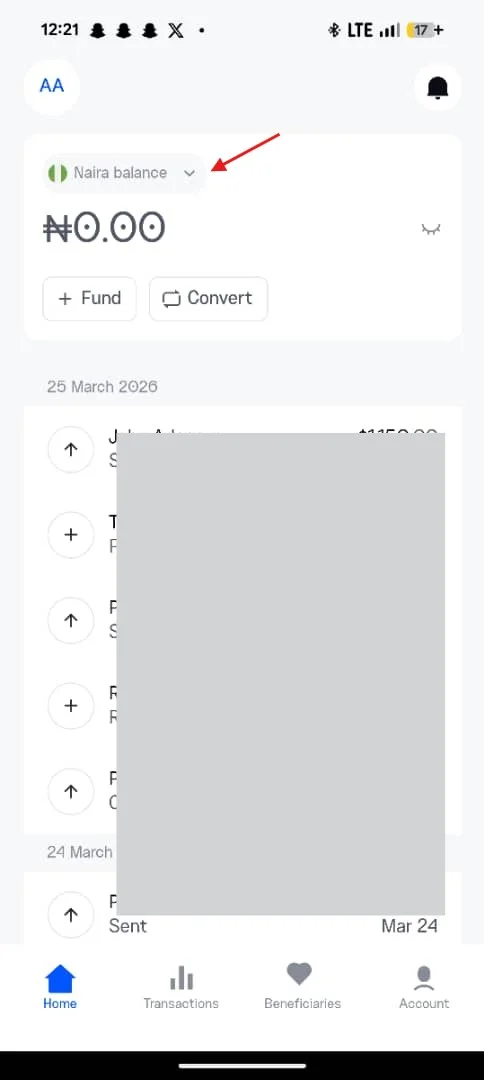
Step 1: Tap Your NGN Balance on the Homepage
Open the Clea app and navigate to your homepage, where both your NGN and USD balances are displayed. Tap on your NGN balance to access your naira wallet.
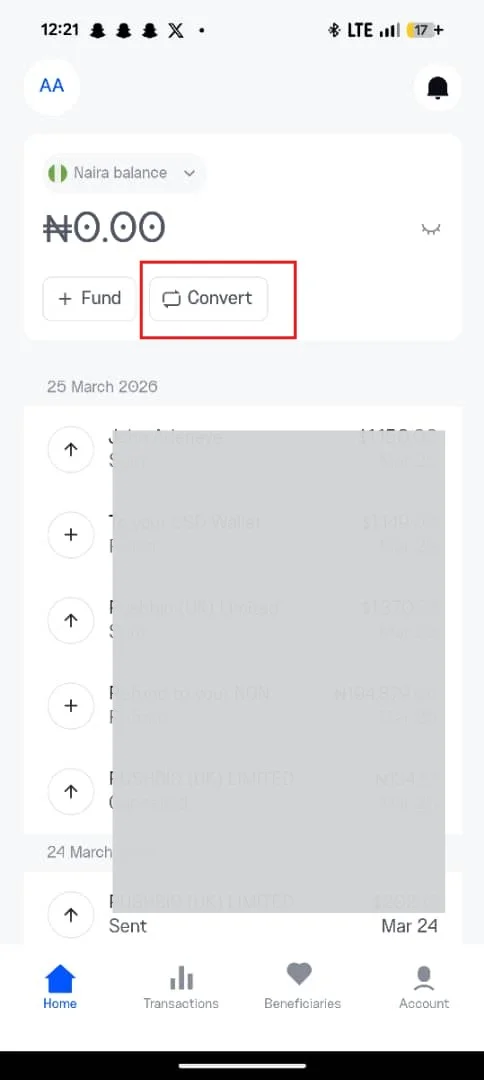
Step 2: Select Convert
Within your Naira wallet, select the Convert option.
This takes you directly to the conversion interface. The process is immediate and self-contained, without additional requests or approvals.
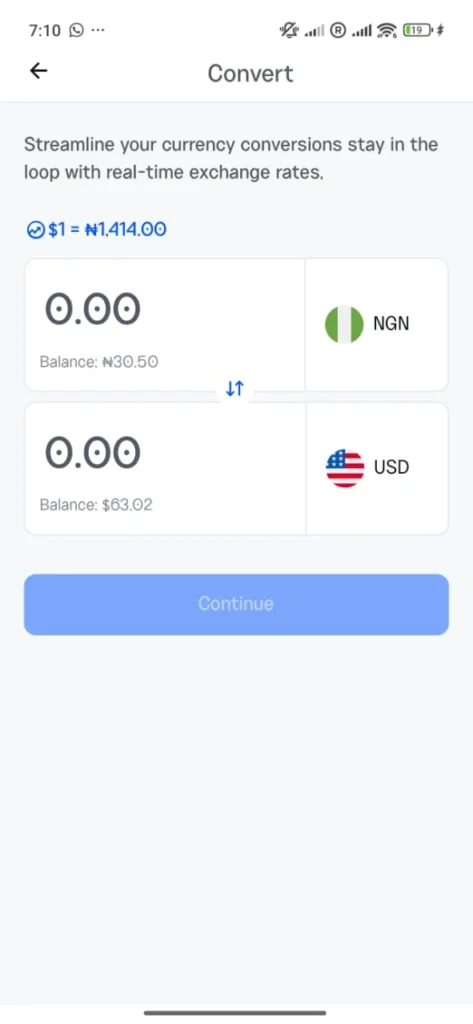
Step 3: Enter the Amount You Want to Convert
Enter the amount in naira you intend to convert. The app will automatically calculate the equivalent in USD based on the current exchange rate.
If your supplier has issued an invoice in dollars, it is advisable to work backwards. Determine the Naira equivalent at the current rate and ensure your wallet is funded accordingly, including any applicable fees.
Step 4: Click Continue and View the Exchange Rate
Tap Continue to view a summary of the transaction. This includes:
- The exchange rate applied
- The exact amount in USD you will receive
- Any associated fees
All key details are presented before confirmation, allowing you to make an informed decision.
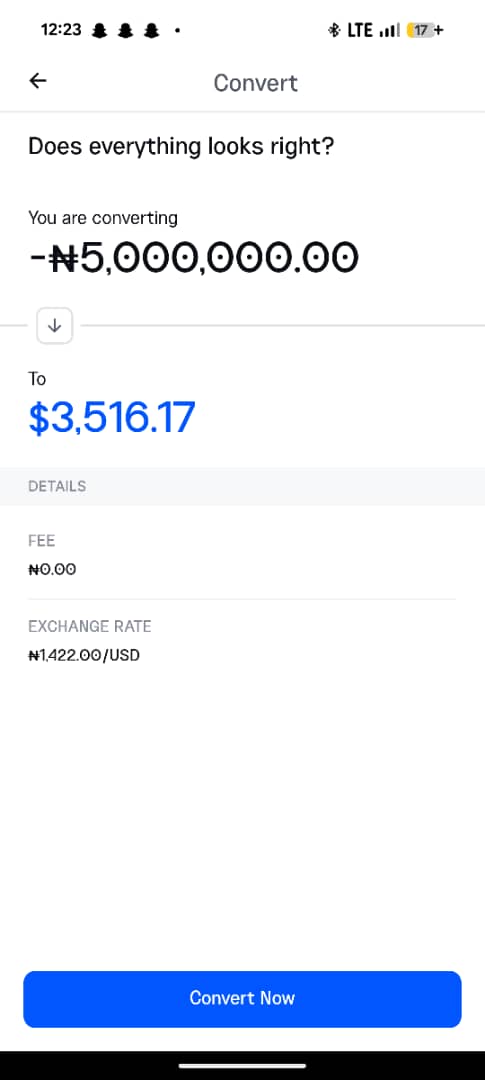
Step 5: Continue to Confirm
Tap Convert Now to complete the transaction.
Your NGN balance will be debited, and your USD balance credited immediately. Once completed, you can pay your supplier using available transfer options, such as wire transfer, ACH, or SWIFT, depending on your requirements.
What to Do After Converting
Once your USD balance is available, you can initiate payment to your supplier directly from the app. Enter the beneficiary’s banking details or select a saved recipient, confirm the amount, and complete the transfer.
A few things that matter for importers specifically:
- Payments go out in your business name – This is important for proper reconciliation on the supplier’s end. Many vendors, including large marketplaces and manufacturers, match incoming payments to registered buyer accounts. When payments come from unrelated or third-party accounts, they are often delayed or flagged. Sending from your registered business ensures a clean match.
- Multiple payment rails are available. Depending on your supplier’s preference and urgency, you can choose the most suitable rail (Fedwire, SWIFT, ACH, RTP). All payments are processed between 2 and 5 hours.
Tips to Get the Most Out of Each Conversion
- Convert during active market hours – Exchange rates tend to be more competitive when market activity is high, particularly during weekdays. Periods of low activity can result in wider spreads.
- Fund your wallet ahead of key payments – If you have upcoming supplier deadlines, it is more efficient to fund your wallet in advance. This allows you to convert and pay immediately when needed, without last-minute delays.
- Avoid reacting to short-term movements – Exchange rates can shift within short periods. Acting on sudden spikes without urgency can lead to unnecessary cost. Where timing allows, it is often better to observe the trend before converting.
- Stay aware of current rates – Regularly checking the exchange rate helps you build a sense of what is reasonable. Over time, this makes it easier to identify favorable moments to convert. With Clea, you get real-time rate updates, making it easy to stay informed.
Every import business runs on timing and margins. Delays and inefficiencies in FX affect both.
A straightforward conversion process allows you to move when needed, meet supplier expectations, and keep your numbers intact. Over time, that consistency becomes an advantage.